 NexusDM
Writing expressions
The expression view shows a filter as text. You can type in it, or paste an expression you have copied from somewhere else, such as this Guide. This page is the reference for that text: what it may contain, how to refer to tags, story beats and nodes, and how to fix the messages you meet when something is wrong. If you build filters with the builder view, you can skip it.
Text with a mistake in it never replaces the filter already applied. While there is a problem the map keeps showing the last selector that worked, and the problem is listed under the text, so typing can’t break your map. The builder won’t open an expression that has errors either, until you fix them.
Syntax
An expression is made of conditions joined with AND, OR and NOT. Brackets group them. NOT binds tightest, then AND, then OR, so a OR b AND c means a OR (b AND c).
ship.crew >= 20 AND (ship.status = "at_sea" OR ship.status = "in_port")- Case. Keywords and function names ignore case:
and,AndandANDare the same, and so areconnected_toandCONNECTED_TO. Everything else is written as the app spells it. The built-in names, such asnode.name,node.typeandnode.tags, are lower case, and so are the direction values"any","in"and"out". Type keys and field keys are written exactly as the type defines them, so a field keyedports_of_callis neverPorts_Of_Call. - Text. Write text in single or double quotes:
"Mara"and'Mara'are the same. Inside the quotes only two escapes exist, a backslash before a quote ("a \"quoted\" word") and a doubled backslash ("C:\\ships"). Text is at most 200 characters, and can’t be empty; to test for an empty value, useIS EMPTY. - Numbers and booleans. Numbers are written plainly, such as
20or2.5, and booleans aretrueandfalse, with no quotes. A number is never coerced to text or the other way round, soship.crew = "20"is refused. - Dates. A date is quoted text in the form
"2024-05-17". - Lists.
INtests a value against a list in square brackets, which is how “is any of” is written:ship.status IN ["at_sea", "lost"]. A list holds items of one kind, and can’t hold another list. - Reserved words. A type whose key is also a keyword, such as a type keyed
node, is written in brackets:[node].description. - Constants.
truematches every node andfalsematches none.
The expression view prints the canonical form: keywords in upper case, text in double quotes and only the brackets that are needed. When you leave the editor or switch to the builder and back, it shows your filter in that form, which is also the form this Guide uses.
Referring to tags, story beats and nodes
Some conditions compare with something in your campaign rather than with plain text. They name it, and the app turns the name into the thing itself.
- Tags. A tag can be written by name,
node.tags HAS "Act 1", but only while the name is unique in the campaign. When two tags share a name, which can happen when a module has a tag named like a campaign one, the name is refused and you write the tag by id:node.tags HAS tag("<id>"). The error offers a button for each tag the name could mean, and clicking one writes the id for you. - Story beats and nodes. These are always written by id, as
beat("<id>")andnode("<id>"). Names are not unique, so there is no shorthand. The simplest way to get one is to build the condition in the builder, then switch to the expression view and copy the text.
Fields are stored by reference, not by name, so renaming a field keeps your filters working. The expression view just prints the new name the next time you look at it.
Relationship arguments
connection(…) and connected_to(…) take a condition, and connected_to accepts up to three
named arguments after it. Each is written once, in any order, and the app prints them in the
order below.
connected_to(node.type = "clue", via: type = "Points to", direction: "in", at_least: 3)via:narrows the connections that count to those matching a condition on the connection itself: itstype,textortags.direction:is"any"(the default),"in"or"out". A connection that has no direction matches only"any".at_least:is a whole number from 1 to 1,000. Inconnected_toit needs that many different neighbours, so two connections to the same clue count it once. Inconnectionit needs that many matching connections, and each parallel connection counts. Leaving it out, or writingat_least: 1, means one; the app doesn’t print it.
connection(…) takes only at_least:. The relationship conditions are explained, with
before-and-after maps, on the Connections and neighbours page.
Suggestions with Ctrl+Space
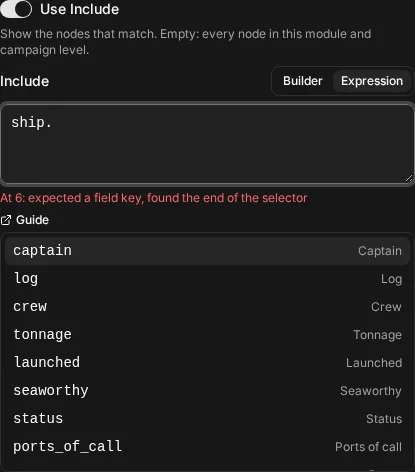
You don’t have to remember any of this. As you type, and whenever you press Ctrl+Space, the editor suggests what can come next: the types, the fields of a type after its key and a dot, the operators a field takes, the options of an enum, your tags, and the functions and connectives. Move through the list with the up and down arrow keys and press Enter to insert the highlighted suggestion. Escape closes the list.
Limits
An expression is bounded, so that a filter stays quick to evaluate on a large campaign:
| Limit | Most allowed |
|---|---|
Conditions in one expression, those inside via: included | 64 |
Levels of AND, OR and NOT nested inside each other | 8 |
Relationship steps, connection or connected_to inside another | 3 |
| Items in one list | 64 |
| List items in the whole expression | 256 |
| Characters in one piece of text | 200 |
| Characters in the whole expression | 20,000 |
| Parts of the expression, counting every condition and connective | 256 |
at_least: is neither a condition nor a relationship step, so it never counts towards these.
A whole map view, with all its filters and rules, may hold 1,024 conditions.
The headline example on the Examples page, nodes that at least three clues point at, uses exactly the three relationship steps allowed. Connections and neighbours shows how they count.
Common error messages
Each problem is listed under the text with the character it starts at. Clicking it selects the text in question.
| Message | What it means and how to fix it |
|---|---|
there is no type … | The type key doesn’t exist. Check the spelling and case, which must match the type’s key. |
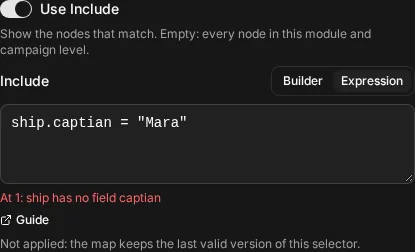
… has no field … | The type has no field with that key, as in the picture above. Use Ctrl+Space after the dot to see the fields. |
… has no option "…" (options: …) | An enum field’s value isn’t one of its options. The message lists the keys that are. |
expected a value, found … | Something is missing or doubled where a value should be, such as ship.crew >> 10. |
expected an operator after the target, found … | A field must be followed by an operator such as =, >, CONTAINS, HAS, IN or IS EMPTY. |
… does not apply to … | That field’s kind doesn’t take that operator, such as > on text. The message names the operator as GT, GE, LT, LE, EQ or NE, so > on text reads GT does not apply to …. |
… takes text, … takes a number, … takes true or false | The value is the wrong kind. Numbers and booleans are written without quotes, and text with them. |
IN takes a list, such as ["a", "b"] and only IN takes a list | IN needs square brackets, and no other operator accepts them. |
the string is not closed | A quote was opened and never closed. |
only \\, \" and \' escapes are allowed | A backslash in text is followed by something other than a quote or another backslash. Double it: \\. |
text to compare cannot be empty; use IS EMPTY | "" is not a value to compare with. Test for emptiness with IS EMPTY. |
a date is a calendar date "YYYY-MM-DD" | Write the date as year, month and day, such as "2024-05-17", and make sure it exists. |
there is no tag named "…" | No tag has that name. Check the spelling, or pick the tag with Ctrl+Space. |
more than one tag is named "…"; choose one | The name isn’t unique. Click the “Use …” button for the tag you mean, or write tag("<id>"). |
write beat("<uuid>") to refer to a story beat | Story beats and nodes are written by id: beat("<id>") and node("<id>"). |
… is a keyword; write a type keyed … as […] | Your type’s key is a reserved word. Write it in brackets, such as [node].description. |
there is no function …; functions are connection and connected_to | Only connection(…) and connected_to(…) can start a condition. |
tag(…) is a value; compare something with it | tag("<id>"), beat("<id>") and node("<id>") are values, so they go on the right of an operator, as in node.tags HAS tag("<id>"). |
bare type describes a connection; write node.type or use connection(…) | type, text and tags on their own describe a connection. Write node.type = "ship", or put them inside connection(…) or via:. |
the selector is empty; write true to match everything | There is nothing in the editor to parse. Write true, or switch the filter off. |
node.… is not a built-in; built-ins are … | Use one of the names the message lists after node.. |
direction is "any", "in" or "out" | The direction must be one of those three quoted words, in lower case. |
at_least is from 1 to 1000 and at_least must be a whole number | Give at_least: a whole number from 1 to 1,000. |
a connection condition takes type, text and tags, not node conditions | Inside connection(…) and via:, you can test only the connection’s own type, text and tags. |
unexpected … after a complete selector | There is leftover text after the end of the expression, often a missing AND or OR. |
a selector has at most … conditions and the other at most messages | You’ve gone over one of the limits above. Split the filter, or simplify it. |
the selector is too long and the selector nests too deeply | The expression is very large, or its brackets are nested far deeper than any filter needs. Simplify it. |