
CSV import
If your connections are already in a spreadsheet, import them instead of typing each one. The importer works like the one for nodes: you choose a file, match its columns, preview what will happen, and only then import.
Open it with Import connections at the bottom of the Entities sidebar, or with Import connections from CSV in the New connection dialog. It imports into the module you have open, or at campaign level if none is open.
The file
Save the spreadsheet as CSV, with one row for each connection. Row 1 holds the column names. The dialog’s first step has a template to download, which shows the expected columns:
| Column | What it holds |
|---|---|
| From | The name of the node the connection starts from. Required. |
| To | The name of the node at the other end. Required. |
| Type | The connection’s Type, up to 64 characters. |
| Note | The connection’s Note. |
| Direction | -> points From to To, <- points To to From, and none or an empty cell means no direction. |
| Tags | Tag names separated by ;. Each must already exist: the importer never creates a tag. |
| From type | The node type of From, by name, for when the name alone could mean several nodes. |
| To type | The node type of To, by name, for the same reason. |
Columns can be in any order and extra columns are fine. A file can hold up to 2,000 rows and 2 MB. A blank Direction means no direction: the importer never infers a direction from the Type.
Matching the columns
Choose the file and the next step lists each of its columns with what it imports as. Columns named like the template map themselves; the rest are Ignore until you choose. From and To must each be matched.
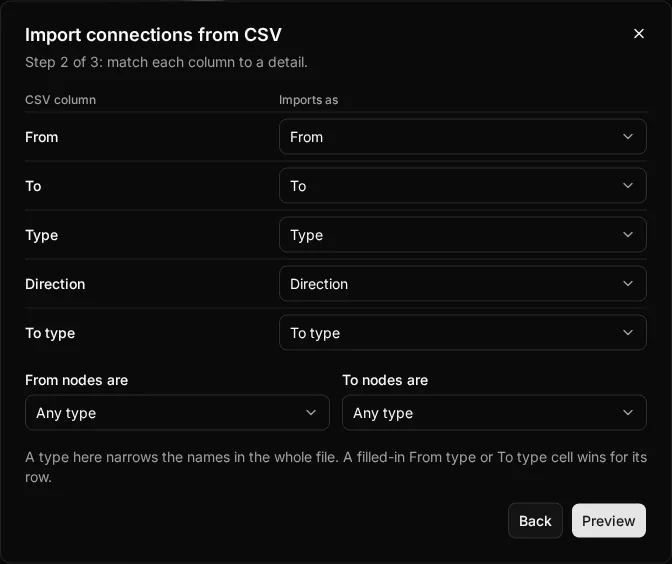
Below the table, From nodes are and To nodes are can narrow every name in the file to one node type. They are the quickest fix for a file where every From is an NPC and every To is a location. A filled-in From type or To type cell wins for its row.
How names are matched
Each name is matched against the nodes the open scope can see: the open module’s nodes and the campaign-level ones, or only campaign-level ones with no module open. Names match ignoring capitals and spaces at either end, and archived nodes never match. A module’s own node beats a campaign-level node of the same type with the same name.
If a name could still mean more than one node, the importer never guesses. For example, a module might hold a location and a ship that are both called The Black Anchor. That row is marked Ambiguous (skipped) in the preview, with the candidates listed under the row along with their type and module.
You can fix an ambiguous row in two ways, without editing the name:
- Fill in the row’s To type (or From type) cell, such as
Ship, for one end of that row. - Choose a type for the whole file with From nodes are or To nodes are.
Previewing
The preview checks every row and writes nothing. It summarises the rows, then lists each with its status, rows with problems first:
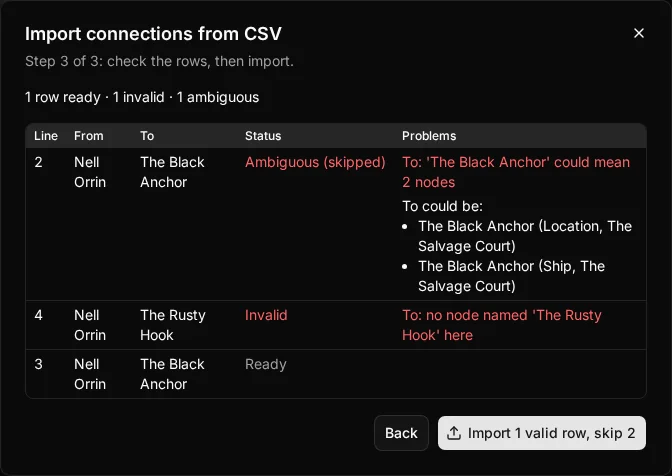
- Ready: the connection will be created.
- Invalid: the row has a problem, listed in the Problems column. An unknown node, node type or tag, a Type over 64 characters, or the same node at both ends makes a row invalid.
- Ambiguous (skipped): the name could mean several nodes, as above.
- Already connected (skipped): the row repeats an existing connection, or an earlier row of the same file.
- Overwrites existing, or Updates filled details of existing: the row repeats an existing connection and the campaign is set to overwrite it.
Duplicates follow the campaign’s duplicate connections setting, the same as when you create one by hand. A repeat is skipped, unless the setting is Create it anyway (every row is created), Overwrite or Overwrite only what I filled in (the row writes over the existing connection, once for each existing connection).
Importing
When some rows are invalid or ambiguous, the button reads Import and the number of valid rows, and skip and the number of rows it will leave out. If the campaign’s duplicate connections setting changes after you preview, the import is refused and you preview again, so it never does something you did not see.
When it finishes, the dialog says how many connections it added or overwrote and how many rows it skipped, and why.