
Duplicate connections
Making many connections quickly makes it easy to draw the same one twice. NexusDM now watches for that.
An exact repeat of a connection is refused by default. Before this, every connection you created was saved, so a second identical one silently appeared. Now, with the default setting, nothing new is made and you are told about the connection that already exists, with a button to open it.
Connections that differ are still allowed. Two nodes can share several connections, such as one Calls at and one Is wrecked at, as long as they are not alike in the details the campaign compares.
What counts as a repeat
A new connection is a duplicate connection when it joins the same two nodes as an existing one, and the details the campaign compares are the same. By default it compares all four:
- The two nodes are always compared, in either order, so A–B and B–A are the same pair.
- Type and Note are compared ignoring capitals and spaces at either end, so Located At and located at count as the same. A blank and a missing one count as the same too.
- Direction is compared from the pair’s point of view, so A → B and B ← A are the same.
- Tags are compared as a set, in any order.
When several existing connections match, the oldest one is used.
Changing the setting
The setting belongs to the campaign and is under Management, Entities, in the section When a new connection repeats an existing one. It is separate from the setting for duplicate node names, so you can answer differently for each. Each change saves straight away.
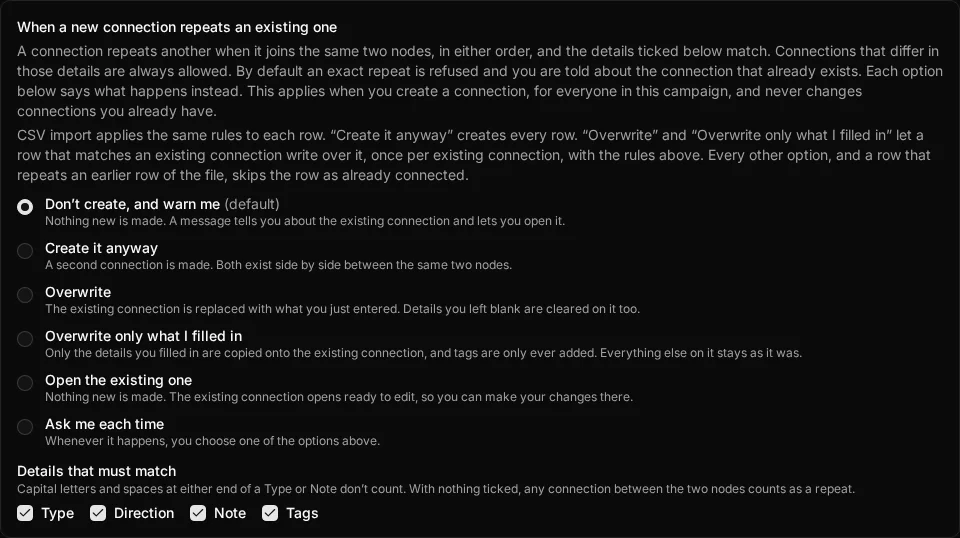
The Details that must match tick boxes (Type, Direction, Note and Tags) choose what counts as a repeat. Untick them all and any connection between the two nodes counts.
The six options say what happens when a repeat is found:
| Option | What happens |
|---|---|
| Don’t create, and warn me | Nothing new is made. A message tells you about the existing connection and lets you open it. This is the default. |
| Create it anyway | A second connection is made, so both exist side by side. |
| Overwrite | The existing connection is replaced with what you just entered, including clearing any details you left blank. |
| Overwrite only what I filled in | Only the details you filled in are copied onto the existing connection, and tags are only ever added, never removed. |
| Open the existing one | Nothing new is made. The existing connection’s edit form opens, with your template kept so you can carry on afterwards. |
| Ask me each time | A dialog asks you to choose one of the other five whenever a repeat is found. |
Where it applies
The setting applies whenever you create a connection: in the New connection dialog, in draw mode, from a node’s sheet, with C and drag or L on the
map, and for each row of a CSV import. In draw mode a warning
appears in the panel and any dialog returns you to drawing. When you add a node with /new quick create, a repeat connection is quietly skipped.
It never touches connections that already exist, including parallel connections you already have. It does not apply to a campaign you import from an archive, to copying a module, or to the sample campaign.
Both the choice and the tick boxes travel with a campaign archive. An older archive gets the defaults when you import it.